 Atlas Network Engineer • • 1,523 words • 8 min read
The Cat7 and Cat8 Ethernet Myth: What You Really Need
Do Cat7 and Cat8 cables reduce gaming ping? We debunk cable marketing traps with shielding physics, crosstalk analysis, and real-world benchmarks.
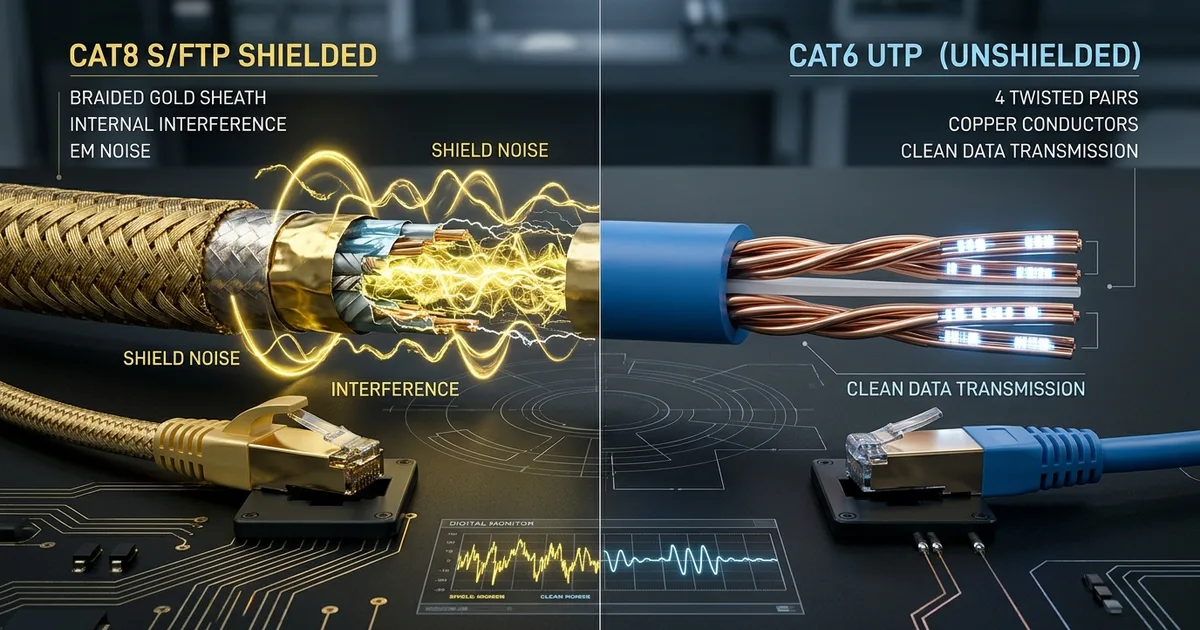
TL;DR (Direct Answer): Cat7 and Cat8 Ethernet cables will not lower your gaming ping, increase your broadband speed, or improve streaming quality. These cables are designed for short-distance enterprise data centers, not homes. In fact, their heavy metallic shielding requires grounded commercial equipment; plugged into a normal plastic home router, that shield acts as an antenna that can actually introduce packet loss. For almost every home and gaming setup, standard unshielded Cat6 or Cat6a is faster than your devices can handle, far cheaper, and mathematically optimal.
The Shopping Cart with Formula 1 Tires
Walk down the digital aisles of Amazon or eBay, and you will see dozens of braided, gold-plated cables labeled "Cat8 40Gbps High-Speed Professional Gaming Cable." Marketers want you to believe that running a Cat8 cord from your wall jack to your PC is the secret to winning gunfights in competitive shooters.
It is modern snake oil. Buying a Cat8 cable for your home gaming rig is like bolting Formula 1 racing slicks onto a supermarket shopping cart. The tires can technically support speeds over two hundred miles per hour, but your legs can still only push the cart at three miles per hour.
Your home internet connection is limited by your Internet Service Provider (ISP) subscription, your network card, and your router's internal processing power. Swapping a regular network cord for a heavy, expensive industrial cable does not widen that pipe. You can test these throughput bottlenecks directly inside our AI Playground to see how physical limits govern network flows.
The Physics of Twisted Pairs: Why Signal Speed Is Fixed
To understand why "faster" cables are a myth, we must look at how electricity moves through copper wire.
Wire Pair A (+)  ──/\──\/──/\──\/──  (Carries signal)
Wire Pair B (-)  ──\/──/\──\/──/\──  (Carries inverted signal)
                 ▲ Noise hits both equally, canceling out at destination
Ethernet relies on differential signaling, which means transmitting two identical signals down a pair of copper wires at the same time, with one inverted. When the receiving device reads the signal, it subtracts the inverted wave from the original wave. Any electromagnetic noise picked up along the way hits both wires equally and vanishes through simple subtraction.
Inside every network cable, four pairs of copper wires twist around each other. The twist pitch—how many times the wires rotate around each other per inch—determines how effectively the cable cancels out internal noise (crosstalk, interference leaking between adjacent wire pairs).
Crucially, electrical signals travel down copper at roughly 66% the speed of light (known as the Nominal Velocity of Propagation). This speed is an immutable property of physics and copper. A Cat8 cable cannot carry electrical pulses down a wire any faster than a humble Cat5e cable can.
The Cable Hierarchy: Cat5e Through Cat8
Network categories define the frequency (measured in Megahertz, or MHz) a cable can sustain without signal degradation, not the raw velocity of individual packets.
| Cable Category | Max Bandwidth | Max Speed at 100m | Common Shielding | Best Use Case |
|---|---|---|---|---|
| Cat5e | 100 MHz | 1 Gbps | Unshielded (UTP) | Basic home internet |
| Cat6 | 250 MHz | 1 Gbps (10 Gbps up to 55m) | Unshielded (UTP) | Ideal sweet spot for homes |
| Cat6a | 500 MHz | 10 Gbps | UTP or Shielded (STP) | Future-proof home 10 Gbps runs |
| Cat7 | 600 MHz | 10 Gbps | Shielded (S/FTP) | Proprietary legacy standard |
| Cat8 | 2,000 MHz | 25G / 40 Gbps (max 30m) | Shielded (S/FTP) | Switch-to-switch data centers |
Cat7 is an oddity: it was never formally recognized by the TIA/EIA standard body for standard RJ45 connectors. Legitimate Cat7 relies on specialized industrial connectors like GG45 or TERA. Most "Cat7" cables with snap-in RJ45 heads sold online are non-certified marketing inventions. Cat8 is real, but it is strictly designed for runs under 30 meters between servers inside high-density server racks.
The Floating Shield Trap: How Cat7 and Cat8 Can Hurt You
Higher-tier cables like Cat7 and Cat8 use STP (Shielded Twisted Pair) or S/FTP (Shielded with Foiled Twisted Pair) construction. Beneath the outer plastic jacket lies a metallic foil or braided copper wrap intended to block high-frequency interference.
However, metal shielding must be physically grounded at the switch or patch panel to safely bleed away electrical interference. Consumer switches and home routers use ungrounded plastic RJ45 ports.
[ Microwave / EMI ] ───▶ ( Radiated Noise )
                               │
                               ▼
[ Floating Metal Shield ] ════════════════════════════ (No ground wire)
                               │
                               ▼
               [ Plastic Port on Home PC / Router ]
                 (Noise dumps directly into data lines)
When you plug a shielded cable into an ungrounded plastic port, the shield cannot drain that electricity. Instead, it turns into a floating antenna. It absorbs ambient electromagnetic energy from vacuum cleaners, power bricks, and microwave ovens, dumping that noise directly into the data pins. You can explore how electromagnetic radiation affects bit error rates with our Interactive Engineering Simulations.
Three Ethernet Myths You Should Stop Believing
- Myth 1: "Cat8 cuts down ping in online games." Your gaming latency is dictated by routing hops across public internet infrastructure, physical distance to the game server, and bufferbloat on your router. A Cat8 cable provides 0.000 milliseconds of latency improvement over a $5 Cat6 cable over a typical two-meter desk run.
- Myth 2: "Flat ultra-thin cables perform identically to round cables." Flat cables look sleek under rugs, but they achieve their profile by ditching the protective internal spline and untwisting the wire pairs. Without proper twist geometry, flat cables suffer from devastating crosstalk and packet retransmissions at distances over a few meters.
- Myth 3: "Gold-plated metal connectors make data packets arrive faster." Gold plating prevents atmospheric oxidation and pin corrosion in damp environments. It does not alter electrical conductivity or packet delivery speed in any measurable way.
The eSports Venue That Grounded Itself
During a regional semi-pro tournament in 2022, a newly built gaming lounge suffered constant, unexplained packet jitter in competitive matches. Players reported sudden micro-teleporting and frame hitches. The internal gigabit switch reported thousands of cyclic redundancy check (CRC) errors—corrupted packets forcing retransmissions across the local network.
The venue owner had spared no expense, wiring every gaming PC to the central rack using thick, braided Cat7 cables purchased online.
When network engineers inspected the rack, the problem was obvious: the cables were plugged directly into ungrounded desktop switches mounted on painted wooden shelves. The thick foil shields inside the Cat7 cords were acting as giant radio antennas, soaking up electrical noise from nearby LED stage lights and air conditioning compressors.
The fix required zero software tweaks. Technicians ripped out the expensive Cat7 runs and replaced them with standard, unshielded Cat6 (UTP) cables. Packet errors immediately dropped to zero, latency variance flattened, and the tournament finished without another dropped frame.
Frequently Asked Questions (FAQ)
Is there any scenario where a home user needs Cat8?
No. Cat8 was engineered specifically for short-distance connections (under 30 meters) between servers and switches inside enterprise data centers running 25 Gbps or 40 Gbps hardware. No consumer internet service, motherboard network card, or home gaming console supports these protocols. Using Cat8 in a home environment provides zero operational benefit while introducing rigid cabling that is prone to grounding issues.
Why are flat Ethernet cables dangerous for high-speed networks?
Flat cables discard the physical geometry required for clean network transmission. Ethernet depends on continuous, tight twists between pairs to cancel out electrical noise. Flat cables force wires to run side-by-side in parallel with minimal insulation, causing severe crosstalk and dropped packets at higher bandwidths. For reliable connections, always choose standard round cables that maintain their internal twist pitch.
Does a higher Category cable lower ping in online games?
No. Gaming ping is the round-trip travel time of network packets between your machine and a remote gaming server. That transit time depends on the physical distance to the server and routing hops across the internet. Because electricity travels through all copper network cables at roughly two-thirds the speed of light, higher category cables cannot deliver packets faster.
What is the ideal cable for 1 Gbps and 10 Gbps home networks?
Standard Cat6 UTP (Unshielded Twisted Pair) is the sweet spot for nearly all residential installations. Cat6 reliably handles 1 Gbps speeds across 100 meters, and easily supports 10 Gbps speeds for runs up to 55 meters. If you are building new walls and need guaranteed 10 Gbps performance across a full 100 meters, install Cat6a.
How can I tell if my router or switch supports shielded STP cables?
Look closely at the RJ45 Ethernet ports on your switch or router. If the port opening is made entirely of plastic, it is ungrounded and designed exclusively for unshielded (UTP) cables. If the port has a metal collar with small spring-loaded contact tabs inside, and the device connects to an earth ground via a three-prong power plug, it supports shielded cables.